01 / Focus
Manual Mode
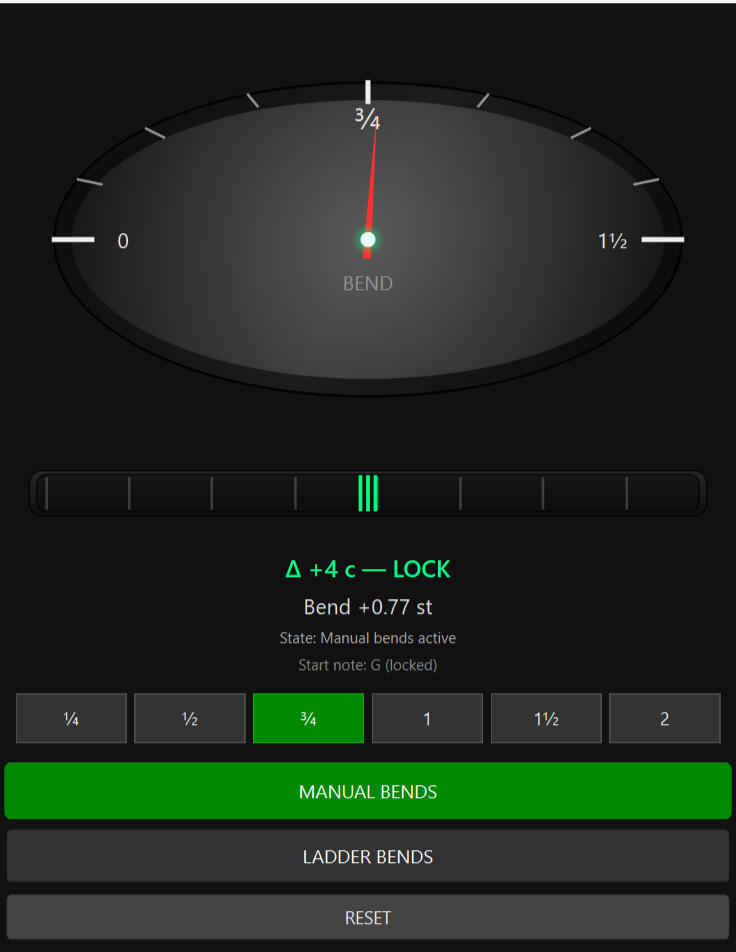
Practice a specific bend with a target-focused zoom dial centered on your selected bend amount.

Your guitar bends are probably out of tune right now — and you can't tell.Most guitarists can hear when a bend goes wrong. But hearing it and fixing it are two different things — because without visual feedback, every bend is a guess.I built Bend Practicer after years of not knowing how far off my own bends were. Once I could see them in real time, everything clicked.Bend Practicer shows you exactly where your bend lands — instantly, visually, every time you play.Read our guide: How to Practice Guitar Bends in Tune

Manual mode zoom dial
"I didn’t realize how sharp my bends were until I saw this.”
— Experienced player, B.Z. (35+ years)“Half-step bends are harder than I expected. This helped me hit them accurately.”
— Experienced player, M.P. (50+ years)"I struggled with guitar bends. I practiced bending up to fretted notes. I used tuners, I relied on my ear and tried playing the same bends repeatedly. I never really knew how far a bend was supposed to go. I needed a clearer reference — something that showed me where the bend should land while I was still hearing and learning it. This led me to build Bend Practicer!"
— BLZ Precision Guitar Tools (creator)“Much better than using a tuner. This actually helped me hear and fix my bends.”
— Beginner , T.P. (~2 years)
Video of Bend Practicer
Who is Bend Practicer for
For anyone wanting to understand and learn guitar bends
For guitarists who can hear when a bend is wrong, but struggle to hit it consistently
All players, beginner, intermediate, and advanced working on ¼-step, ½-step, ¾ -step and whole-step bends
Practice Modes
Manual Mode
Practice a specific bend with a target-focused zoom dial that centers on the selected bend for clarity and precision
Ladder Mode
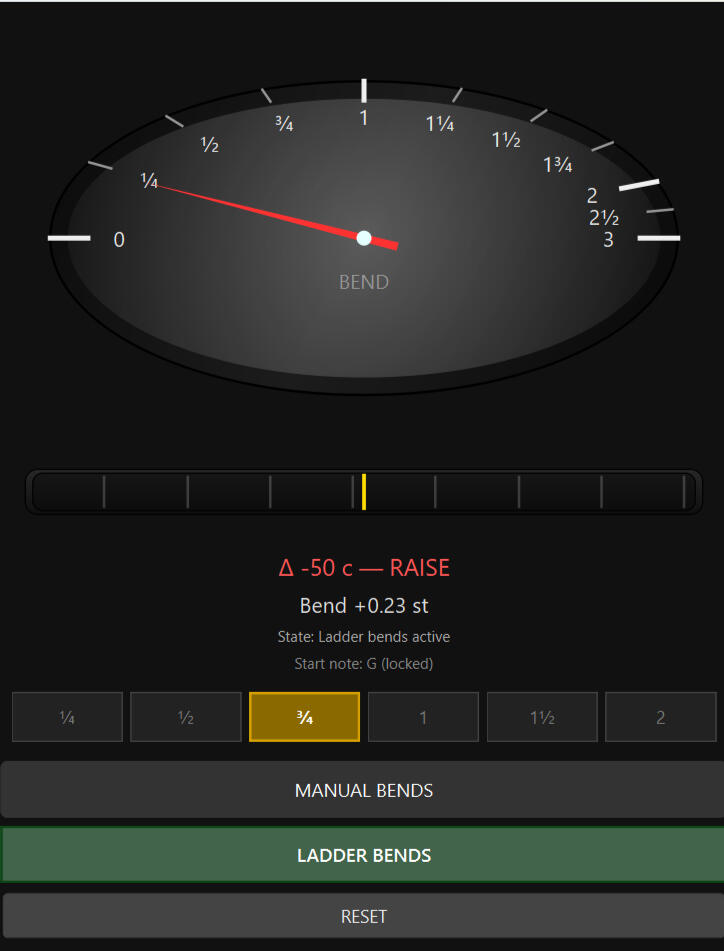
Practice ascending and descending bend targets automatically (¼ → ½ → ¾ → 1 → 1½ → 2)
Free Play
No target bend is active
The needle responds live to your bends
Manual mode and Free Play are perfect for practicing vibratos
What it does
Created to make bend targets visually obvious without mental math
Trains quarter-step, half-step, and whole-step bends using clear visual targets
Provides real-time visual feedback inspired by high-resolution strobe tuners
Helps develop repeatable pitch control and muscle memory
Designed for focused practice, not performance or stage use

Ladder Mode
Visual feedback works best when it confirms what you already heard
Design Philosophy
Bend Practicer is designed as a practice aid, not a lab instrument and not a replacement for ear training
The goal is repeatability: learning how a bend feels, sounds, and looks when it’s right — and being able to hit it consistently
If the dial centers on the target and the strobe locks, the bend is correct
System Requirements
OS: Windows 10 or Windows 11 (64-bit)
CPU: Any modern dual-core or better (Intel i5 / AMD Ryzen class or newer recommended)
RAM: 8 GB recommended (4 GB minimum)
Audio: Built-in audio interface or USB audio interface
Latency: Lower audio buffer sizes improve responsiveness
Internet: Not required after activation
Performance Note:
Bend Practicer runs entirely on your local CPU in real time. Pitch tracking and bend detection are lightweight and run comfortably on typical modern laptops and desktops
Refunds
Try Bend Practicer for 30 days. If it isn't right for you, email [email protected] within 30 days of purchase for a full refund.
This policy does not limit any refund rights you have under applicable law.

Built by a guitarist, focused on pitch control and effective practice.
Questions or comments?
Contact: [email protected]
Watch short demos on YouTube
See Manual, Ladder, and Free Play modes in action.
 Bend PracticerBLZ PRECISION GUITAR TOOLS
Guitar bend training software for Windows
Hear the target. Play your bend. See whether you land flat, sharp, or in tune—with real-time visual pitch feedback from Bend Practicer.
Windows 10 / 11 · One-time purchase · No subscription
See your pitch. Refine your control.
Listen first. Use the display to check.
For guitarists who can hear when a bend goes wrong, but want a clearer reference while learning to hit it consistently. Connect the sound, the movement, and the pitch.
Work on quarter-step, half-step, three-quarter-step, and whole-step bends. Start with a comfortable note and a target you can hear.
The live display helps you see whether your bend is below, above, or at your selected target.
Practice holding a steady pitch, check what you heard, and repeat. Build control rather than a habit of watching a meter.
Focused practice, at your pace
Focus on one target, move through a ladder of bend amounts, or explore your pitch in Free Play.
Watch the short demos ↗Bend Practicer demo. Press play to watch.
01 / Focus
Practice a specific bend with a target-focused zoom dial centered on your selected bend amount.
02 / Progress
Practice ascending and descending targets: ¼ → ½ → ¾ → 1 → 1½ → 2 steps.
03 / Explore
Play without an active bend target. The needle responds to your pitch as you explore bends and vibrato.
Designed for focused, single-note practice. Visual feedback complements listening and ear training; it does not replace them.
Player feedback
“Half-step bends are harder than I expected. This helped me hit them accurately.”
“Much better than using a tuner. This actually helped me hear and fix my bends.”
Built by a guitarist
I practiced bending up to fretted notes and used tuners, but struggled to know how far off my bends were. I wanted a clearer reference while listening and learning.
That led me to build Bend Practicer: a way to connect how a bend feels, sounds, and looks, and practice hitting it consistently.
Barry · BLZ Precision Guitar Tools
Your next practice session
One-time purchase. No subscription.
Applicable sales tax included.
Check the Windows and audio requirements below before buying.
If Bend Practicer isn’t right for you, email [email protected] within 30 days of purchase for a full refund.
This policy does not limit any refund rights you have under applicable law.
Windows 10 or Windows 11 (64-bit), a modern dual-core processor or better, and 4 GB RAM minimum (8 GB recommended). Use a compatible built-in audio input or USB audio interface for your guitar. Lower audio buffer sizes improve responsiveness. An Intel i5 / AMD Ryzen-class processor or newer is recommended.
Bend Practicer is Windows software that works with your guitar and a compatible audio input. It is not a phone app, browser app, or standalone hardware device.
Internet is required for activation. After activation, practice works offline on your computer.
Yes. Manual Mode lets you focus on a selected bend, and Ladder Mode moves through bend targets from a quarter step to two steps. Manual Mode and Free Play can also be used to practice vibrato.
No. It provides visual feedback for focused single-note practice. Listen first, then use the display to check your pitch. Do not rely on it to independently assess two simultaneously sounding strings. It is a practice aid, rather than a lab instrument or stage-performance tool.
Contact Barry at [email protected] for help with your purchase, setup, or a replacement computer.
In development · Private Windows evaluation
A new learning tool from BLZ Precision Guitar Tools. Explore intervals, triads, arpeggios and scales by playing one note at a time, with fretboard charts and interval lookup for reference.
We are looking for feedback on getting started, using the controls, and working with different Windows computers and guitar audio setups. This is an evaluation build, not a finished product for sale.
You will need a Windows 10 or 11 computer and a compatible microphone or guitar audio input for listening activities. It checks individual notes, not strummed chords. Interval lookup and fretboard charts can be explored without a microphone.
No purchase is required to ask about testing. Email Barry with your Windows version, audio setup, and what you would like to try. Barry will reply with trial details and instructions.